
Pipeline CRM
ManagementVisual sales pipeline with custom stages, unlimited deal fields, and stage-weighted forecasting for B2B teams up to 50 people.
- Custom pipeline stages and unlimited custom fields with conditional logic so you model your actual sales process, not bend to the software.
- Stage-weighted forecasting and stalled-deal reporting that surfaces deals with no activity for a set period, plus automations to trigger follow-up tasks without relying on memory.
- Native email integration (Gmail and Outlook), built-in eSignature on Grow plan, and native QuickBooks Online sync so accounting data syncs both directions.
Overview
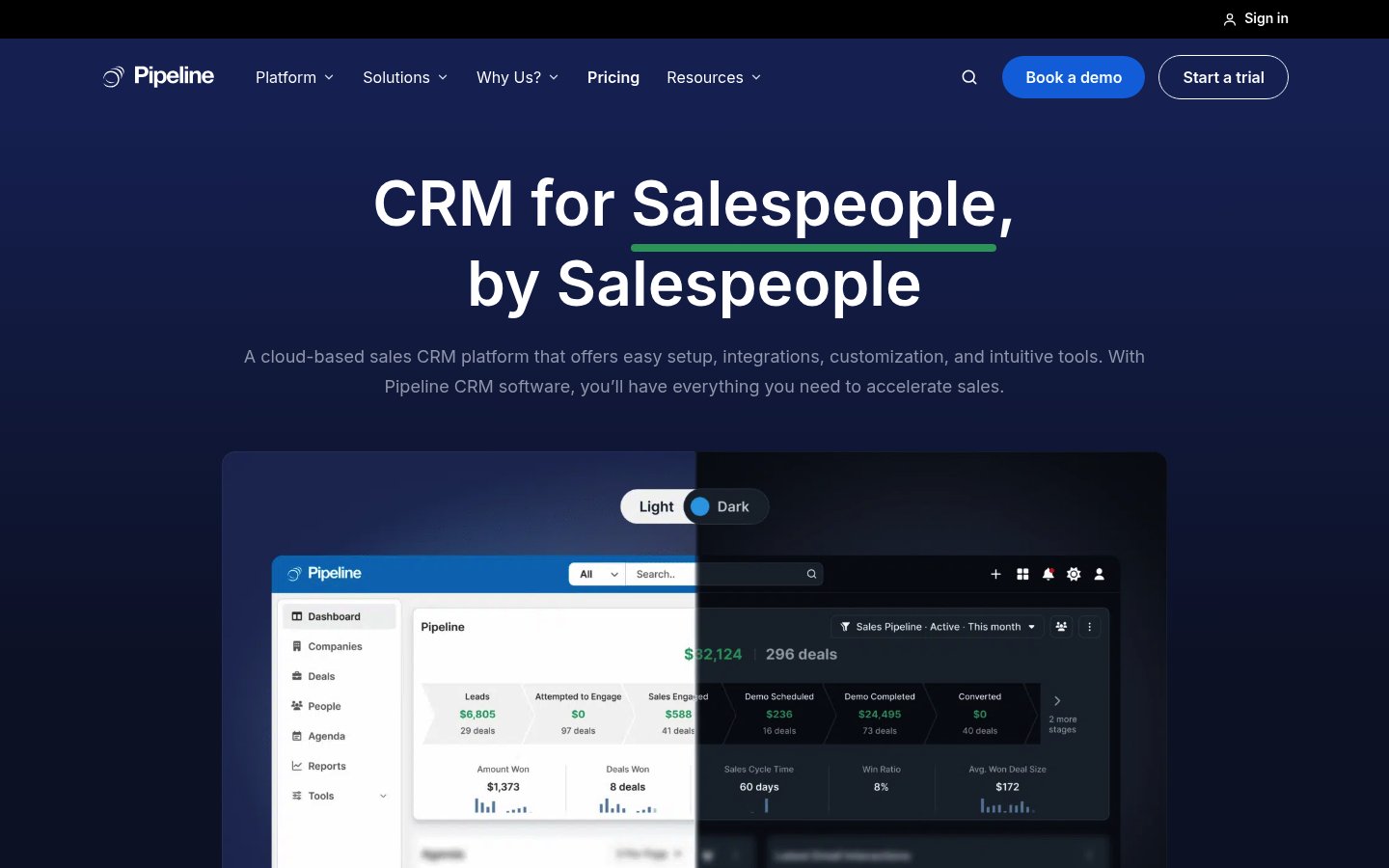
Pipeline CRM is a sales CRM for small and mid-size B2B teams, built around a visual Kanban pipeline where deals drag across stages you define yourself. Unlike generic CRMs that force you into preset funnels, Pipeline lets you create multiple pipelines with custom stages matching your actual sales process—so a 12-month capital sale and a 2-week repeat order don't average into a forecast nobody believes. Every deal holds unlimited custom fields with conditional logic, so the two or three things that actually decide your deals stay as structured, filterable data instead of buried in notes. You get stalled-deal reporting that surfaces anything with no activity for a set period (automations open the follow-up task without anyone remembering), stage-weighted forecasting so your forecast number is defensible, and reporting that forecasts by stage rather than just summing hope. The product lives in your daily workflow: you spend most time on the pipeline board itself, with email, tasks, and integrations fed in around it. It's positioned for operators at the 5–50 person scale who need to see their entire book at a glance and spot where it's jammed.
How it works
You start with a 14-day free trial (Grow plan, no card required) and land in the setup flow. First step: import your contacts and open deals from CSV or Excel—Pipeline's import handles most migrations in about three business days, and US-based live chat walks you through it. Once your data is in, you define your pipeline stages by renaming or reordering the defaults (Qualified Lead, Proposal, Contract, Signed) or creating custom ones that match your real process. You can run multiple pipelines side by side if you have genuinely different kinds of sale. Next, you add the handful of custom fields that describe your deals—win probability, discount authority, timeline, whatever decides them. These become filters and reporting dimensions, so you can slice by them later. You connect your email (Gmail or Outlook integration logs every customer message against the right contact and deal automatically) and link QuickBooks Online if you use it (customers and invoices sync both directions). Then your team gets trained in one hour session—the typical sequence is: everyone logs in, sees the empty board, drags a few test deals across stages to understand drag-and-drop, then reviews the dashboard showing deals by stage. From there, daily work looks like: reps log activities (calls, emails, meetings) against deals, deals move across the board as they progress, and you run a quick morning check of the dashboard to see where all deals are by stage and resolve any overdue tasks. Stalled-deal reports highlight anything with no activity for 30 days (configurable), and stage-based automations can open a follow-up task the moment a deal sits for too long. Email campaigns go out to filtered lists directly from the CRM, with engagement (opens, clicks, replies) flowing back onto the contact record. If you need documents signed, you generate a proposal or contract from your own Word template (Instant Docs merges customer and deal details automatically), send it for eSignature, and track its status from the deal record—no second appointment needed. Mobile app (iOS and Android, included on all plans) covers field reps: they log visit notes, scan business cards, and see map views of nearby customers so one trip becomes three meetings. Integrations with Zapier, an open API, and managed Pipeline Connect service (where Pipeline builds and maintains integrations for you) connect your accounting, field service, ERP, or industry-specific platform.
Best for
Pipeline CRM is built for B2B sales teams of roughly 5–50 people: wholesalers managing a portfolio of acquisition targets through pipeline stages, fix-and-flip operators tracking renovation projects and customer relationships, and BRRRR landlords coordinating a mix of long-term rentals and disposition deals. It works best when your sales process is genuinely yours (custom stages, custom fields) rather than a generic funnel, and when your team will actually log activities daily (the mobile app and Kanban board make that friction-free). The product is strongest for construction (with a customer case from a 50–500 person remodeling company), manufacturing, professional services, and property development. It is not designed for high-velocity consumer or transactional sales, nor for teams that need bundled marketing automation and service-desk capabilities. On pricing, it's most rational at 5–10 team seats: the per-user model makes it expensive if you have 50 people, but cheap if you have five and scale incrementally.
Pricing reality
Pipeline CRM runs $25–$49 per user per month on annual billing across three tiers: Start ($25), Develop ($33), and Grow ($49). Monthly billing costs $29, $39, and $59 per user per month. Enterprise pricing is custom. The 14-day free trial runs on the Grow plan with no card required and unlimited seats so everyone can experience the full feature set. Start plan includes 1 pipeline, 250 active deals per account, 25 custom fields, and basic automations (1 automation rule). Develop adds 2 pipelines, 2,500 active deals, 35 custom fields, 10 automations, and performance reporting. Grow (most popular) includes 5 pipelines, unlimited active deals, unlimited custom fields, 20 automations, email templates, bulk emails, eSignature, project management, and advanced reporting (Hindsight). All plans include unlimited file storage, deal and activity reporting, people and company records, email integration, task templates, mobile app, map views, lead forms, and data sharing. Premium add-ons (Data Enrichment, Email Validation, Pipeline Connect managed integrations) are flat monthly fees on top of subscription and available at any tier. Onboarding services packages start at $750 one-time for guided setup, data import, and team training. Annual billing saves $48–$120 per user per year vs. monthly. No per-property caps; no per-lead limits. Most teams go live in 1–3 weeks.
Lets you define your own pipeline stages and unlimited custom fields instead of forcing your workflow into generic templates; includes native QuickBooks Online sync, mobile apps with business card scanner, and stalled-deal reporting that surfaces deals with no recent activity.
Pricing
Reviews across the web
✓ What operators praise
- Easy to use with straightforward onboarding and navigation
- Highly flexible — configurable to fit unique business workflows
- Customizable deal fields and clear pipeline stage tracking
! Common concerns
- Email integration unreliable; syncing issues with Outlook and Gmail
- Reporting is limited; hard to build executive-level or historical reports
Generated by REskout AI from public review content across the platforms above. Independent of our scoring rubric.
Screenshots & documents
What operators say · 0 reviews
No reviews yet. Be the first operator to review Pipeline CRM.
✎ Write the first review